Showing posts with label sharepoint2010. Show all posts

Wednesday, September 22, 2010

Service Applications in sharepoint 2010

TechNet defines Service applications as “a resource that can be shared across sites within a farm or, in some cases, across multiple farms.” Previously resources were shared between sites using the Shared Service Provider (SSP) model. The SSP model worked fairly well with simple deployments but little information was available for complicated distributed deployments which led to a lot of frustration. In addition, one of the big complaints was that the SSP was only available for MOSS versions and was not available for WSS. The Service Applications framework has been built directly into Foundation services which makes it available to all flavors of SharePoint.

A Modular Approach
SharePoint Server 2010 ships with services for all of the main MS Office apps, Search, User Profiles, Managed Meta-Data, Performance Point, and BCS. Not only can you define which applications are configured, but you can manage the associations so that the applications can be exposed to specific SharePoint web applications. Since it is possible to deploy the same service multiple times you can support different configurations and authentication models to support more complex deployments. In addition there are situations where you can use FAST search on some applications and regular Search on others in the same farm. There are an unlimited number of deployment possibilities.


Since the framework is open this provides real opportunities to the ISVs in areas like vertical applications in just about every area. Some of the ECM and BPM vendors have been heavily integrated with SharePoint for years so I think this can only make their offerings that much more powerful.


Another advantage to the modular approach is that it is possible to for both Microsoft and the ISVs to provide new services or service versions outside of the typical long release cycle. I’m hopeful that this will enable some of the currently evolving technologies and features to catch up.

Friday, August 27, 2010

SharePoint 2010 KeyFeatures

SharePoint 2010 is an innovative platform that can be divided into categories : Sites, Composites, Insights, Search, Content and Communities.
In this post we will try to cover the different key feature improvements related to each of the categories sited above.
Sites
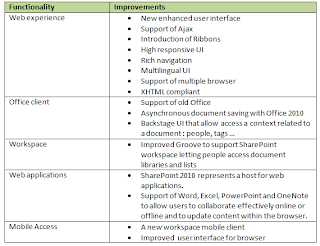
Microsoft team has enhanced some functionality that already exists with SharePoint 2007. The table bellow indicates how these functionalities have been improved.

Communities
Collaborative content makes content search and creation much easier. We can collaborate on blog, wiki, video, pictures …
The introduction of the social feedback and organization feature which previously has been used within Microsoft teams. The feature includes bookmarks, tagging, rating…
User profiles and MySite have been also enhanced. User profiles allow explicit tagging to set colleagues, interests and expertise. MySite is also improved and contains a new interactive organization browser made with Silverlight.
Content management
Content managing is one of the most interesting components of SharePoint for companies.
SharePoint 2007 has some limitation and threshold which are now improved and reduced. SharePoint 2010 now supports large lists so we can have much larger document libraries and lists. We will talk about the limitations and thresholds of SharePoint 2010 in a future article.
Enterprise metadata has been improved with SharePoint 2010. Document set is a new feature introduced with SharePoint 2010 and which represents a collection of document that can be used as single object for workflows and Metadata. Other improved features are the web publishing including Digital Asset Management, Governance and records management.
Search
Search capacities improvement is one of the most important changes in SharePoint 2010. Microsoft has made big investments on this feature. One of the major changes is the inclusion of the FAST search server with SharePoint 2010. Search aspects will be detailed in a future article.
Insights
Insight is a set of functionalities that are related to business intelligence. The picture bellow shows the different components of Insights.

Thumb pic here


PerformancePoint Services – Now fully integrated with SharePoint 2010, PPS allows you to create rich, dynamic, and interactive dashboards combining structured and unstructured information together into a single view.
Excel Services – Improved to support the latest capabilities in Excel 2010 including Spark lines and Visual Slicers, as well as improved fidelity with Excel workbooks.
PowerPivot for SharePoint – Sharing your PowerPivot enabled Excel workbooks uses Excel Services. All of the above applies to these workbooks as well.
Visio Services –Display your Visio diagrams and other data-driven objects using just a browser. Diagrams are rendered in either SilverLight or PNG. With support for refreshing content built into Visio Services.
Chart Web Parts – This web part allow you to add chart to SharePoint pages. The data source of the Chart should be in SharePoint including External lists and Excel services.
Status Indicators – these are the SharePoint 2007 KPI Lists. Allows users to quickly create and visualize the key indicators they want to track on a SharePoint page.
Business Connectivity Services – With the BCS you can connect to LOB/ERP applications using Database, web service … and makes all CRUD operations.
Composites
Composites describe the breadth of solutions build with SharePoint.
SharePoint 2010 comes with the following improvements
Improvement of SharePoint designer. Now allow safe customization out-of-the box.
Improvement of InfoPath forms services, Access services which allow users to publish Access solutions to SharePoint.Use of sandboxed solutions with isolation and resource limitation (Memory, SQL CPU … ) but these sandboxed solution doesn’t cover all object model but support custom web parts and event receivers.

Disclaimer : This is my personal weblog. The opinions expressed here is representing my own and not those of my employer.

Tuesday, August 24, 2010

SharePoint Server 2007 Certification Training in Bangalore

Certification:- Microsoft Certified Technology Specialist (MCTS) in SharePoint Server 2007 Application Development(70-542).

Prerequisites: This course is designed for individuals with a basic understanding
knowledge of ASP.NET 2.0 and Visual Studio 2005 tools
.
Module 1 – Introduction to SharePoint Development

  • Introduction On Microsoft Office SharePoint Server 2007
  • Shared Service Provider (SSP)
  • SharePoint Products and Technologies
  • Difference between WSS and MOSS2007

Module 2 – Managing Content with Lists and Libraries

  • Creating Custom Lists and Document Libraries
  • Creation of Views based on criteria
  • Site columns
  • Creating/updating/propagating
  • Scopes
  • Content types
  • Creating/updating/propagating
  • Content types settings
  • Using Lookups and Calculated Columns
  • Information management policies

Module 3 – Configuring User Groups and Permissions

  • Creating users in Active Directory
  • Creating Mail box for the user
  • Configuring out look account settings
  • Configuring out going E-mail settings in Share Point

Module 4 – SharePoint Security

  • Site level
  • List or Library level
  • Item Level
  • Creating custom permission levels
  • Creating and using alerts

Module 5 – SharePoint Portal operations and Administration

  • Working with managed paths
  • Quota Templates
  • Blocked file types
  • Creating Site as Templates and Reusing
  • Creating Custom List Templates

Module 6 – Authentication

  • Forms Based Authentication
  • Windows Based Authentication

Module 7 – InfoPath

  • Designing the InfoPath forms
  • Publishing InfoPath form to SP Site
  • Submitting Form data to data base

Module 8– SharePoint Object Model

  • SharePoint core namespaces
  • SPSite and SPWeb context
  • Working with SPList,SpListItem,SpQuery
  • Migrating the Data from SQL SERVER Database to SharePoint List
  • Working with SharePoint Navigation System
  • Programmatically accessing data


Module 9- Web parts Development

  • Creating and Deploying Web Parts using VS
  • Creating and Deploying web part using VS extensions for WSS
  • Creating web part using Asp.net controls
  • Creating Custom Web Part Properties
  • Debugging the Webparts
  • Using Content Editor WebParts
  • Using Smart parts
  • Using Web user controls in web parts
  • Creating Custom Web Part menu items

Module 10-Business data catalog and CAML

  • Introduction on BDC
  • Creating Application definition file Using Meta man
  • Introduction on BDC Web parts
  • Working with built in web services

Module 11- Event Receivers

  • Introduction on Event Receivers
  • Synchronous Events
  • Asynchronous Events
  • Creating Receivers and registering them with SpLists/Libraries

Module 12- Features

  • Introduction on Features
  • Creating the features
  • Installing/uninstalling features to the sharePoint Site
  • Activating/De-activating features to the sharePoint Sites in Different Scopes
  • Creating Feature Receivers
  • Solutions or Packages
  • Creating several features and package them as a solution file(.wsp).

Module 13- Workflows

  • Introduction on work flows
  • Working with out-of-the box workflows
  • Creating the work flow using sharePoint Designer
  • Creating Custom Workflow using Visual Studio

Module 14- SharePoint Pages

  • Introduction on SharePoint Pages
  • Application Pages
  • Site Pages

Module 15- Business Intelligence

  • Excel Services
  • Key Performance Indicators (KPI’S)
  • Dash Boards
  • Reports

Module 16- Working with SharePoint Designer

  • Introduction on SharePoint Pages
  • Open An Existing SharePoint Site
  • Create A New SharePoint Site
  • Explore SharePoint Folders (Team Site)
  • Create ASP.NET Page
  • Modify a built-in CSS Style Sheet
  • Create/Attach a CSS style sheet
  • Create/Attach/Detach a Master Page
  • Check-In/Check-Out
  • Add Web Parts
  • Add Web Part Zone
  • Adding Images (_images directory)
  • Reset to Site Definition
  • Data View Parameters
  • Creating Custom List Forms
  • Backup a Site
  • Restore a Site ......etc
  • Creating and using Custom Themes.

Module 17- Site Definitions

  • Understanding Site Definitions
  • Creating Custom Site Definitions
  • Specify Site Elements and Features Using Onet.xml

Module 18- Enterprise Search

  • Configuring Search Settings in SSP
  • Search Scopes
  • People Search
  • All sites Search
  • Incremental Crawling
  • Full Crawling
  • Creating Custom Search Results Page

After Complettion of the Course : we will provide

  • Study material
  • Interview Guidance
  • Mock Tests
  • Mock Interviews
  • Resume Preparation as per the standards
  • Guidance for Microsoft Certification Exam


Fees Structure :

Regular Batch :

Rupees : 18,000/-

Duration : 17 days [50 hours]

Weekend Batch :

Rupees : 18,000/-

Duration :3 weekends [40 hours]

Note:- we can provide Training as per your needs.

For Any Training related Queries,feel free to contact :venkat @91-9916229967 or
venkat.ramavath@gmail.com

Wednesday, February 3, 2010

SharePoint 2010 overview

What is SharePoint2010?
SharePoint 2010 is the business collaboration platform for the Enterprise & the Web that enables you to connect & empower people through an integrated set of rich features. Whether deployed on-premises or as hosted services, SharePoint 2010 helps you cut costs with a unified infrastructure while allowing you to rapidly respond to your business needs.

we can also define SharePoint as: "SharePoint 2010 is a collaboration tool which connects & empowers people through its integrated set of rich features. "
But does this statement really reflect its real capabilities !!!
  • To be closer we can say SharePoint 2010 facilitates business collaboration in its broadest sense and helps colleagues, partners, and customers to work together in new and effective ways.

Some of the business benefits with SharePoint 2010 are:

  • SharePoint 2010 connects people through both formal and informal business communities, within the enterprise and beyond
  • It enables to manage content throughout the information lifecycle
  • It enhances search capabilities and enable users to quickly respond to the altering business requirements by making data-driven decisions & by deploying customized solutions

New inclusions!!!
Sharepoint 2010 comes packed with a host of technologies like:
SharePoint Foundation 2010 : It is the new version of Microsoft Windows SharePoint service
SharePoint designer 2010: Provides the designers with their tools of choice for rapid development of SharePoint application
SharePoint workspace 2010: It is the new name for Microsoft office groove that allows faster access to Microsoft SharePoint Team sites
Duet Enterprise: It is the joint solution from Microsoft & SAP enabling interoperability between SAP and SharePoint 2010
Let see the benefits for the different Stake holders in an organization:

IT professionals:

  • Improved administration with profound operational insights
  • A scalable service architecture allows to manage services( MySite, taxonomy, search) through a centralized administration
  • Extensible architecture allows third party companies to build and add services to platform
    Provides flexible deployment option with governance control

Developers:

  • Provides a comprehensive collaboration platform with familiar tools, interoperable out of box features
  • Developers can improve productivity with tools like Visual Studio 2010 & SharePoint designer 2010
  • SharePoint 2010 provides new features for business collaboration for ex: Silver light hosting for user interfaces; Client object model; LINQ to SharePoint; data relationships; BCS; large list scalability,flexible deployment option

Partners:

  • Collaboration, content management, enterprise search, business intelligence & web capabilities enable partners to deliver innovative and extensible solutions for customers.
  • SharePoint 2010 provides new capabilities like cloud service, new client side object model, advanced support for .NET & Silver light development & business connectivity open opportunities for partner solution

Why SharePoint 2010???
Comparison:: SharePoint 2010 & SharePoint 2007

  • SharePoint 2010 works on 64 bit Share Point Server
  • SharePoint 2010 makes updating content type easier
  • It let users define the workflow with reusability
  • SharePoint 2010 can associate SharePoint Designer workflows with content types
  • It simplifies record management usage by using in place record management
  • It provides hold & e discovery features to track external actions like litigation, investigation or audit
  • It provides out of box support for compliancy
  • It has improved quality of service making management of SharePoint much easier

Disclaimer : This is a personal weblog. The opinions expressed here represent my own and not those of my employer.